Skip to content
Weldia
Try WPS

Weldia WPS

Welding documentation without switching between Word and Excel

Weldia WPS is dedicated software for creating and managing WPS and WPQR to , and other standards. With Designer built in, a clear document library and automatic checks of WPS against the entered WPQR ranges.

One-month trial on request · 840 US$ per user and year

The joint drawn in the built-in Designer, then the welding parameters.

01 What slows you down today

Less copying. Better documentation.

Word, Excel, catalogues and separate drawings. How much work around a single WPS do you still do by hand? Weldia WPS is software for welding coordinators who value their time.

Documentation in several places

You edit WPS in Word and keep the register in Excel. You check the document layout and whether the list matches the files in the folder.

Weldia WPS combines a consistent template with a document library. The list is maintained automatically and you can export in several languages.

Does our WPQR really cover this?

You compare WPS parameters against the qualification range. After changing the thickness or heat input, you check the values again.

Enter the WPQR ranges once in Weldia WPS. The software checks whether the WPS parameters fall within them.

Drawing again, copying again

You create the weld drawing outside the document and copy material data from catalogues. For the next WPS, you do the same work again.

In Weldia WPS, you draw with the built-in Designer and select materials and gases from your own database.

02 Workflow

How a WPS comes together

See how to create a document in Weldia WPS in four simple steps.

  1. 01

    Enter the data

    The WPS editor guides you through the fields and fills in base materials, filler materials and other details from your databases.

  2. 02

    Add the drawing

    Draw the joint in the built-in Designer, no exported file in between.

  3. 03

    Check the coverage

    The editor suggests a suitable WPQR for the WPS you are creating and checks its parameters against the linked WPQR ranges in real time.

  4. 04

    Print and find it again

    Export the document to PDF and find it later in the automatically kept list.

The editor: base materials picked from your database, filler materials with their designations.
Base and filler materials in the WPS editor
The check marks a heat input outside the range of the WPQR before the document leaves your desk.
Heat input outside the WPQR range, marked in red

03 Databases

Every WPS you write makes the next one faster

Each WPS and WPQR is saved to a list you can browse, filter and search. Open an earlier document and reuse it for a new one.

  • Filters by number, WPQR, process and materials
  • Thumbnails of the drawings right in the list
  • Your company database: base and filler materials, gases, product forms, welding positions, tungsten electrodes and more
  • Archive what you no longer use, star the favourites
The WPS list with filters and drawing thumbnails
The company database of filler materials with favourites
WPQR with the qualified ranges of joint type and positions

04 Smart WPQR

Find the right WPQR and keep the ranges in check

Enter the WPQR ranges once. Weldia WPS suggests a suitable WPQR for the document you are creating, then checks its parameters against the linked ranges in real time. You immediately see when a value falls outside them.

The check is only as good as the ranges entered. It saves you the comparing, not the professional judgement.

05 Output

A document anyone can read at first glance

A logically arranged template with your logo, the drawings and footnotes to the standards used.

  • WPS to EN ISO 15609-1, WPQR with the qualified ranges
  • Export in Czech, English and German
  • Your company logo and the name of the person who approved it

The document is an example with model values and a sample stamp.

A finished WPS from Weldia WPS with a sample company logo and stamp

06 Trial licence

Check it on your own documents first

Create an account and request a 30-day WPS trial licence from it. The trial has no feature restrictions, so you can see for yourself whether Weldia WPS works for your documentation.

Weldia WPS trial and WPS PRO compared
ConditionWPS TrialWPS PRO
AccessOn request from your accountPaid licence per user
Licence term30 days1 or 3 years
WPSUnlimitedUnlimited
WPQRUnlimitedUnlimited
ExportWith a watermarkWithout a watermark
DesignerIncludedIncluded
Request WPS Trial

07 References

What our customers say about us

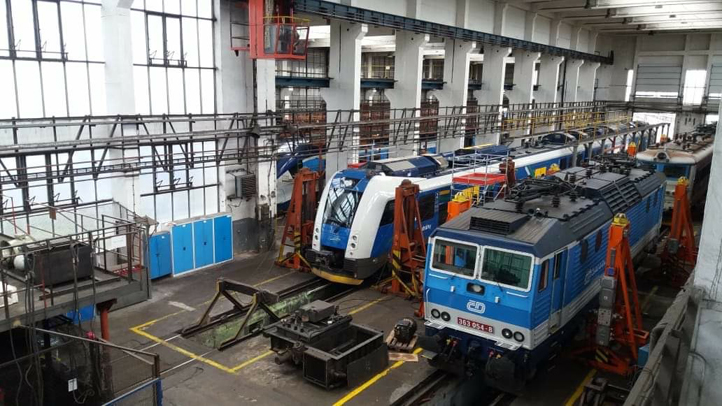
Locomotives and units in a České dráhy maintenance depot
České dráhy

Weld joints for railway vehicle repairs

We particularly appreciate how easy it is to create detailed sketches for WPS documentation directly in the browser, which significantly speeds up approval by welding supervisors.

Milan Kadlec

Technical specialist

České dráhy
BAUMRUK & BAUMRUK
Their applications are always fast, intuitive and save me a lot of time.

Daniel Petřík, IWT, IWI-C

Technologist, welding supervisor (Responsible Welding Coordinator)

BAUMRUK & BAUMRUK
SEA Enterprises
Weldia software has made managing WPS and WPQR much easier for us.

Ing. Miloš Jirák

Head of machine production

SEA Enterprises
Vexve
As we manage more than 1,000 WPS, this module has greatly helped us make our welding documentation work more efficient and organised.

Ing. Petr Liška

Welding engineer, EWE/IWE

Vexve

08 What to expect

What to expect, and what not

Weldia WPS helps you create and manage welding documentation. Here is what to expect from its checks and standards support.

WPQR checks
The check works with the ranges you enter; whether they are right and how the result is used stays your professional call.
Documentation
Weldia WPS supports ISO documentation. AWS documentation is not available. Supported documentation
Certification
The application does not replace certification or the conformity assessment.
Designer symbols
Designer draws weld symbols according to ISO and AWS. This applies to the drawing only; WPS and WPQR documents in Weldia WPS follow ISO standards.

09 Price

WPS PRO for the term you need

One licence per user, paid once for the whole term. Nothing renews by itself; you renew from your account.

  • Unlimited WPS and WPQR documents
  • Export without watermark
  • Designer included for the same user
  • Pay by card or by proforma invoice, PO number and VAT ID on the order
WPS PRO prices per user, excl. VAT
TermYou pay per user
1 year840 US$
3 years1 890 US$

Prices excl. VAT. Weldia WPS already contains Designer for its users.

Do you only need to draw weld joints?

Weldia Designer on its own makes drawings for documents you keep elsewhere.

See Weldia Designer

10 Questions

Before you ask for the trial

Not answered here? Write to us

Is drawing included in the licence?

Yes. Weldia WPS contains Designer. The same user does not need a separate Designer licence.

Does the application certify anything?

No. It helps you write and keep the documentation. The professional responsibility and the conformity assessment stay with you.

Will you move our Word documents over?

Automatic bulk import of WPS and WPQR documents is currently in development and will be available soon.

Which languages does the export use?

Czech, English and German. Check during the trial that the output matches what your customers expect.

Is there a free Weldia WPS?

No. There is a trial on request and the paid WPS PRO licence for one or three years.

What happens to my documents if I do not renew?

Your WPS documents stay available for download as PDF.

Can more colleagues work in it?

Yes. The documents, drawings and the materials database belong to the company account; every colleague with a licence works in the same library.